
How do I complete the TrustLine live scan requirement in Los Angeles?
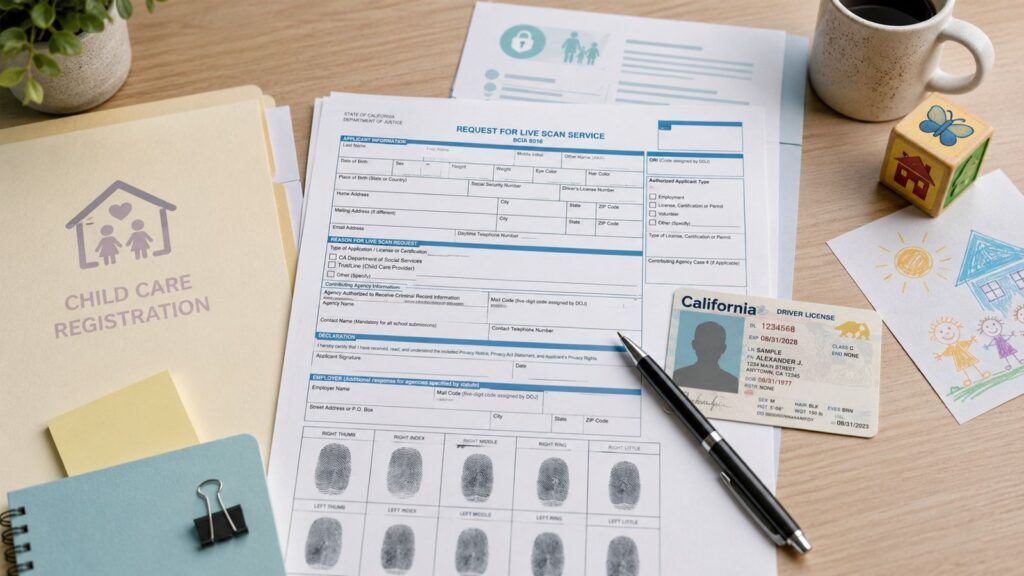
To complete TrustLine Live Scan requirements in Los Angeles, use the TrustLine Request for Live Scan Service form. TrustLine submissions route through the California Department of Social Services using ORI A0448, agency CASDSOCIAL SERV CCL-CRCB, applicant type TRUSTLINE CHSC 1596.603, and applicant title PROVIDER APPLICANT. The operator must select the TrustLine applicant type—not another California Department of Social Services applicant type—and enter the remaining form fields exactly as provided.
Next, keep identity matching clean. Your name and date of birth on the form should match your government ID exactly, including spacing and hyphens. Small differences can slow matching on the receiving side even when the scan is completed correctly.
Finally, leave with proof. Keep your receipt showing the ATI number and save a clear photo of it. The ATI number is the fastest way to track your submission if your file shows pending or if you’re told results were not received.
To schedule fingerprinting in Los Angeles, visit our Live Scan service page.
Why a TrustLine live scan is not interchangeable with other fingerprinting
A common mistake is assuming that “I already did Live Scan for work” means the same fingerprint submission will satisfy every TrustLine-related role. Whether an existing clearance can be used depends on what the original TrustLine registration covered.
If you are already registered with TrustLine for a particular type of child care or caregiver work, that registration can generally remain valid when you move to another employer or agency using TrustLine for the same category. The new organization may still need to associate you with its agency or confirm that your registration is current, but that does not automatically mean you need another Live Scan.
TrustLine applications share the California Department of Social Services ORI and the TrustLine applicant type. A particular employer or organization may still need to associate a registered provider with its account or provide organization-specific application information. A Live Scan completed for an unrelated employer, license, or agency outside TrustLine generally cannot be substituted.
Confirm your TrustLine registration status and any required organization association before scheduling another scan.
Who typically needs a TrustLine live scan
TrustLine is commonly used for in-home caregiver screening. If you are applying to be listed or you were instructed to complete a TrustLine background clearance, the TrustLine live scan is usually part of that process.
The important point is that you should follow the exact instructions tied to your TrustLine application packet. If your instructions include a TrustLine Request for Live Scan Service form, use that form and do not substitute a generic Live Scan form.
If you are temporarily outside California, you may be directed to use fingerprint cards instead of a TrustLine live scan. That is a separate lane and it usually adds timeline, so plan it early.

What the TrustLine form controls
TrustLine is the specific program and applicant type within the California Department of Social Services Live Scan routing. The Request for Live Scan Service form identifies both the department-level agency routing and the TrustLine program. Most preventable errors happen when the TrustLine applicant type or another required form field is entered incorrectly.
Also note that TrustLine Live Scan is different from an FBI Identity History Summary because they are submitted to different agencies for different purposes.
ORI code
The TrustLine ORI is A0448. It identifies the California Department of Social Services agency routing, displayed in the Live Scan system as CASDSOCIAL SERV CCL-CRCB. Other California Department of Social Services programs can use the same department-level agency routing, so the applicant type is what identifies this submission as TrustLine.
Applicant type and title
For TrustLine, the applicant type is TRUSTLINE CHSC 1596.603 and the applicant title is PROVIDER APPLICANT. These fields distinguish TrustLine from the other applicant types available under the California Department of Social Services ORI. Do not select a home-care, residential-care, or other CDSS applicant type for a TrustLine submission.
Applicant information
Your name and date of birth must match your government ID. This matters because the agency matches results to an application file.
Small differences can create matching delays, especially if you have two last names, multiple given names, or you recently changed your name.
Level of service
TrustLine submissions require California DOJ processing. TrustLine screening also generally includes an FBI criminal history check and a name-based review of California’s Child Abuse Central Index (CACI). Follow the exact Request for Live Scan Service form provided for your TrustLine category, because the form controls the fingerprint submission and agency routing.
ATI number
The ATI number is your tracking reference. Keep it.
If there is ever a “we can’t find your results” issue, your ATI number is often the fastest way to locate the TrustLine live scan submission.
Step by step: completing TrustLine fingerprinting in Los Angeles
Step 1: Confirm you have the correct TrustLine Request for Live Scan Service form
Use the form provided with your TrustLine instructions. Confirm that it shows ORI A0448, applicant type TRUSTLINE CHSC 1596.603, and applicant title PROVIDER APPLICANT.
Do not substitute a form or applicant type intended for another California Department of Social Services program.
Step 2: Fill out your fields before you arrive
Complete your personal information neatly and match your ID exactly.
If your application uses one version of your name and your ID uses another, resolve that mismatch before you scan when possible. A mismatch can slow down matching and review.
Step 3: Bring valid ID and payment
Bring a valid government photo ID. If your ID is expired, do not assume it will be accepted.
Bring your payment method. Live Scan pricing often includes a rolling fee plus any required government fees based on the form.
Step 4: Tell the operator this is for TrustLine and hand them the form
This reduces routing errors.
The operator should confirm ORI A0448, select applicant type TRUSTLINE CHSC 1596.603, use applicant title PROVIDER APPLICANT, and enter the remaining routing fields exactly as provided on the form.
Step 5: Review your copy and keep the ATI number before you leave
Check three things before you walk out:
- Your name is correct.
- Your date of birth is correct.
- Your ATI number is printed and readable.
Take a clear photo as backup.
Step 6: Follow any TrustLine proof instructions
Some processes only require the electronic transmission. Others require you to attach a copy of your form as proof.
Follow the TrustLine instruction set you were given so you do not create a delay by missing a simple proof step.
Quick reference table
| Situation | What to do | What you must bring | What you keep | Common delay |
| You are in California with a TrustLine form | Confirm A0448 and TRUSTLINE CHSC 1596.603, then complete the scan | Printed TrustLine form, valid ID, payment | Copy of form with ATI number | Wrong applicant type, ORI, or applicant information |
| You completed it but results aren’t showing | Use your ATI number to help match the submission | Form copy + ATI number | ATI number + scan date | No proof, name mismatch, wrong routing |
| You are out of state | Follow the fingerprint card lane if TrustLine instructs it | Correct instructions + correct card format | Mailing proof + tracking | Wrong card type or incomplete packet |
| Your name format is inconsistent | Fix mismatch before scanning if possible | ID that matches form fields | Copies of any required proof | Manual review delays |
| You used a different agency’s Live Scan | Redo using the TrustLine form | Correct TrustLine form | New ATI number | Results routed to wrong agency |
Conditional requirements
If you are in California
A TrustLine live scan is usually the fastest route because results transmit electronically. Your main risk is routing errors from the wrong form or wrong ORI.
If you are out of state
TrustLine may require fingerprint cards instead of Live Scan when you are outside California. Card-based submissions add mailing time and quality risk, so plan early.
If you need that lane, use fingerprint card options.
If you need a flexible appointment
If you need an on-site option for schedule or mobility reasons, you can use mobile fingerprinting option.
If you have a recent name change
Name changes are a common delay point. Use a consistent name format across your TrustLine application and your TrustLine form. If your instructions require supporting documents, handle them early so fingerprints do not become the final bottleneck.
Common mistakes that delay TrustLine submissions
- Using the wrong form or an outdated form.
- Using the wrong ORI code or selecting another CDSS applicant type instead of TRUSTLINE CHSC 1596.603.
- Typos in name or date of birth.
- Leaving without the ATI number.
- Assuming another Live Scan submission can be reused.
- Waiting too late and losing buffer time.
Most of these are preventable if you prepare your form at home, bring the correct paperwork, and keep your ATI number.
What to bring to your appointment
Your printed TrustLine Live Scan form.
Valid government photo ID.
Payment method.
A pen, so you can make clean corrections if needed.
If you are unsure about a field, pause and verify instead of guessing. Guessing creates delays.
A quick check now can save you a full redo later. Confirm that the TrustLine submission uses ORI A0448, applicant type TRUSTLINE CHSC 1596.603, and applicant title PROVIDER APPLICANT. Make sure your name and date of birth match your ID exactly and follow the level of service shown on the form. After the scan, save your receipt with the ATI number.
FAQs
What is TrustLine Live Scan used for?
TrustLine Live Scan submits fingerprints for the TrustLine background-check registry administered through the California Department of Social Services. TrustLine is identified within the department’s Live Scan routing by its specific applicant type.
What is the ORI code and why does it matter for TrustLine?
The TrustLine ORI is A0448, which routes the submission to the California Department of Social Services. The applicant type TRUSTLINE CHSC 1596.603 identifies TrustLine within that agency routing.
What applicant type should be selected for TrustLine?
Select TRUSTLINE CHSC 1596.603. The applicant title is PROVIDER APPLICANT. Do not select another applicant type listed under the California Department of Social Services ORI.
What is the ATI number?
The ATI number is the tracking reference printed on your Live Scan receipt. It helps locate your submission if your status shows pending or if you’re told results were not received.
What should I bring to a TrustLine Live Scan appointment?
Bring the TrustLine Request for Live Scan Service form, a valid government photo ID, and your payment method. After the scan, keep your receipt with the ATI number and save a photo of it.
Does TrustLine require DOJ only or DOJ plus FBI?
Follow what your TrustLine request form requires. Submitting the wrong level of service is a common reason applicants are asked to redo the submission.
What causes the most common TrustLine delays?
The most common delays are using the wrong form, ORI routing errors, selecting the wrong level of service, name or date-of-birth mismatches, and not saving the ATI receipt proof.
Can I reuse a previous Live Scan submission for TrustLine?
A current TrustLine registration may remain usable when you move to another employer or organization using TrustLine, although the new organization may need to associate you with its account or confirm your status. A Live Scan completed for an unrelated agency or purpose generally cannot be substituted for TrustLine. Confirm your registration status before scanning again.