
How do I fill out the CA DMV Live Scan Request Form so my results route correctly the first time?
If you are completing a CA DMV Live Scan Request Form live scan, treat the form like a routing label. California DMV submissions use ORI A0059, displayed in the Live Scan system as CASDMOTOR VEHICLES. The ORI identifies the DMV agency; the Applicant Type identifies the specific DMV program. The operator must select the exact Applicant Type required by the form and follow its level of service. A correct DMV ORI with the wrong Applicant Type can still produce a misrouted or unusable submission.
The second priority is matching. Your name and date of birth on the form must match your government ID exactly. A small typo or a name format mismatch can slow down matching and trigger a “missing fingerprints” status even when results were sent.
Finally, keep proof. The ATI number printed on your receipt is your tracking reference. If the DMV program later says they cannot locate your submission, the ATI number is usually the quickest way to confirm it and avoid rescanning. If you handle routing, matching, and proof in that order, your CA DMV Live Scan Request Form live scan is far less likely to trigger delays.
To schedule fingerprinting in Los Angeles, visit our Live Scan service page.
What the CA DMV Live Scan Request Form actually does
A Live Scan request form is not a “permission slip.” It is an instruction sheet for routing.
When the operator enters your submission, they do not decide where your fingerprints go based on your story. They enter what your form tells them to enter.
That routing information is what sends your results to the correct DMV lane.
This is why two people can go to the same Live Scan location on the same day and get different outcomes:
One person used DMV ORI A0059 and the correct Applicant Type for the program, so the submission entered the correct DMV workflow.
The other person used the DMV ORI but selected the wrong Applicant Type, or entered another required field incorrectly, so the submission did not satisfy the intended DMV program.
Both people got scanned. Only one submission “counted.”
That is the core idea behind the CA DMV Live Scan Request Form live scan.
When the DMV typically uses Live Scan request forms
DMV fingerprint requirements show up in programs that require background clearance as part of approval. The exact program varies, but the process logic stays the same:
DMV provides or requires a specific request form.
You complete Live Scan under that form’s routing.
DMV receives results under the form’s routing.
Your file clears when results match correctly.
If you do not have the form, do not guess. A generic form is not the same thing as a DMV program form.
The three questions you should answer before you book your appointment
Before you do anything else, answer these three questions:
- Do I have the current DMV Live Scan request form for my program?
- What exact Applicant Type does the form require?
- What level of service does the form require: DOJ only, FBI only, or DOJ plus FBI?
If you cannot answer all three, pause and confirm them instead of guessing.
Key reminder about federal checks (when FBI is required)
If your DMV request form includes an FBI level of service, that portion is a federal record check handled through federal channels under federal authority, not only California DOJ. That is why selecting the correct level of service matters.
You do not need to “upgrade” the submission yourself. You need to follow what the form requests.
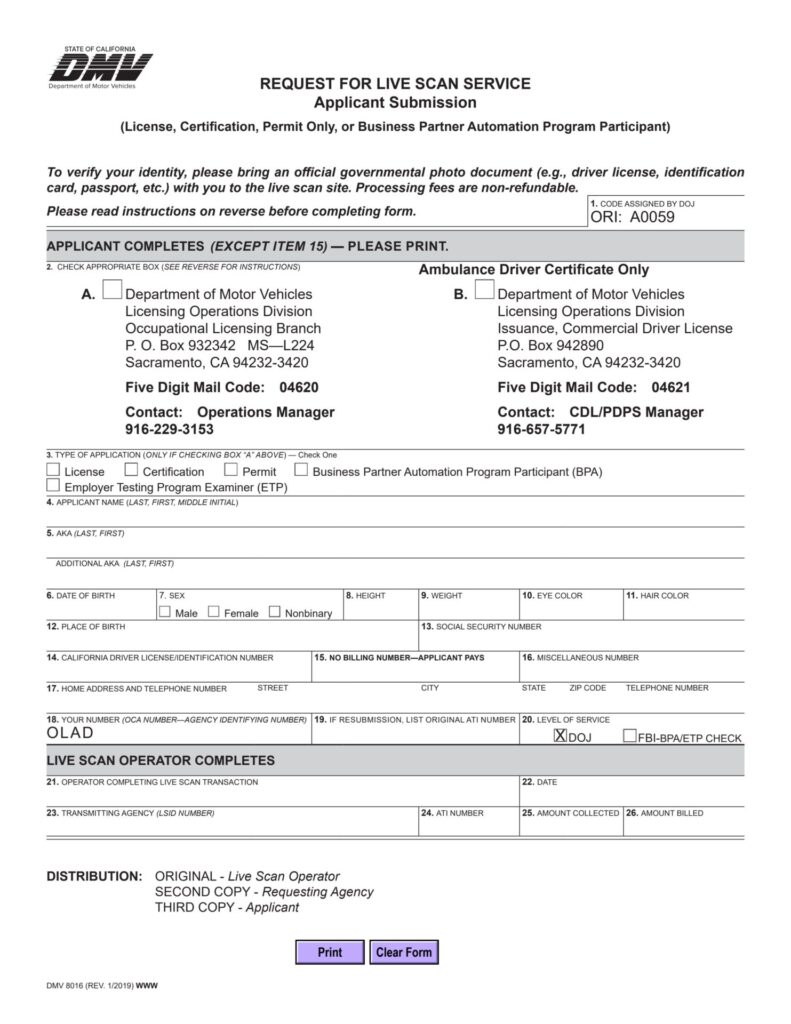
CA DMV Live Scan request form breakdown: the sections that matter most
DMV request forms use the same agency-level routing but different program-level Applicant Types and supporting fields. The form tells the operator which DMV program to select under the DMV agency.
1) DMV agency and ORI
California DMV Live Scan submissions use ORI A0059, displayed as CASDMOTOR VEHICLES, with the agency city listed as Sacramento. This agency-level routing identifies the DMV but does not by itself identify the applicant’s DMV program.
2) Applicant Type and program routing
The Applicant Type identifies the specific DMV program. The operator must choose the exact value required by the applicant’s current DMV form. Examples visible in the DMV system include:
AMBULANCE DRIVERSCHOOL BUS DRIVERSTUDENT ACTIVITY BUS DRVRTHIRD PARTY EXAMINERTOW TRUCK DRIVERTRAFFIC VIOL SCHOOL INSTTRAFFIC VIOL SCHOOL OPTRAFFIC VIOL SCHOOL OWNERTRANSPORTERVEH:DEVELOP DISABLEDVEHICLE VERIFIERYOUTH BUS DRIVER
These are examples, not an exhaustive list. Applicant Title, Submitting Agency, billing information, and any fingerprint certification number must also be entered exactly as provided. Do not substitute a similar-sounding DMV Applicant Type.
3) Applicant information
This is the second biggest cause of delays after routing.
Your applicant details must match your government ID.
Match your first name, middle name (if shown), and last name format exactly.
Match spacing and hyphens.
Match date of birth.
Do not use nicknames.
Do not reverse two last names.
Do not shorten a name because it “looks cleaner.”
If DMV later tries to match results to your file and your name format differs, it can trigger manual review and create delays.
If your name changed recently, keep your submission consistent with the ID you will present unless your DMV instructions specify a different format.
4) Level of service
The level of service decides whether the submission runs DOJ only, FBI only, or DOJ plus FBI.
This matters because submitting the wrong level can leave your requirement incomplete even though you were scanned.
Common mistake patterns include:
Choosing DOJ only because it “sounds like California.”
Choosing the cheapest option.
Asking the operator to “just do everything” when the form requests DOJ only.
The correct move is not guessing.
The correct move is following the form.
If the DMV request form requests DOJ only, submit DOJ only.
If it requests DOJ plus FBI, submit DOJ plus FBI.
5) Fees and the rolling fee
Live Scan costs usually include:
A government fee component (based on the level of service), plus
A provider “rolling fee” (the local fee for capturing prints)
Your total can vary depending on the DMV program and the level of service.
This is not a reason to change the submission type. It is a reason to show up prepared to pay and avoid same-day delays.
6) ATI number and proof
After your scan, you will receive proof that includes an ATI number.
The ATI number is your tracking reference.
If you do nothing else, keep this.
Take a clear photo of the receipt.
Write down the scan date and location.
If your DMV file later shows missing fingerprints or pending, the ATI number is often the fastest way to confirm your submission and help the program locate it.
People lose time because they leave without proof, then they cannot prove what was submitted.
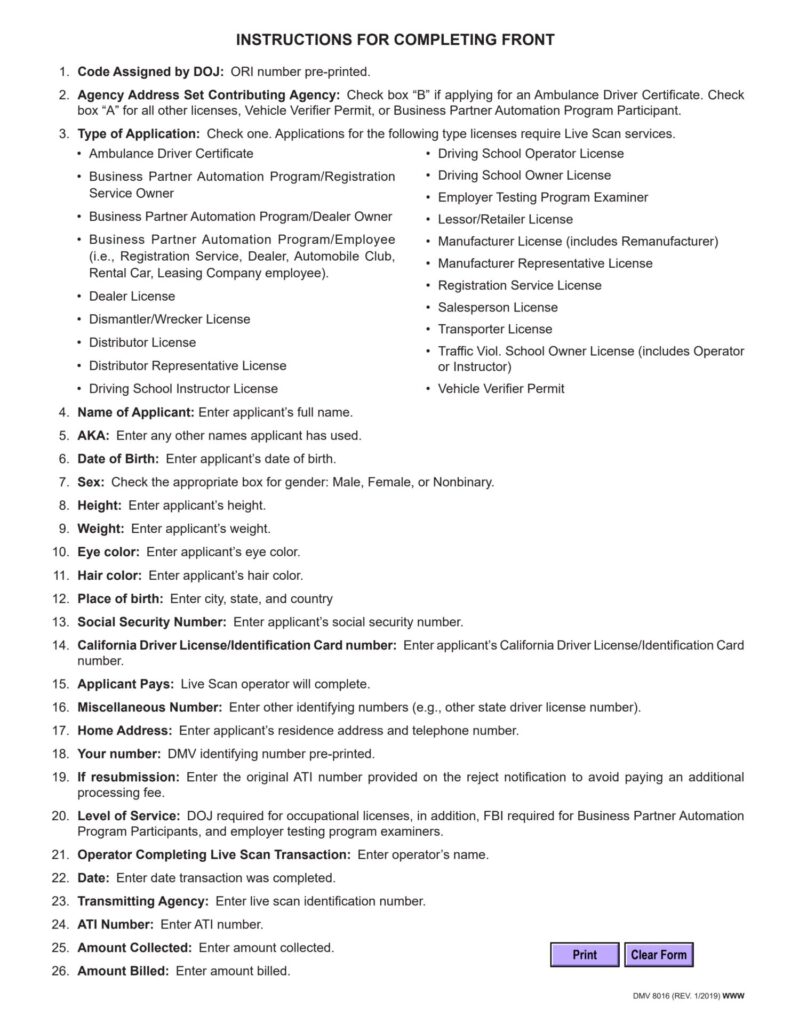
Step by step: completing a CA DMV Live Scan Request Form live scan in Los Angeles
This sequence is designed to minimize mistakes and protect you if follow-up is needed.
Step 1: Confirm you have the correct DMV request form
Use the DMV request form tied to your program.
Check that it includes:
DMV agency ORI A0059
The exact Applicant Type for your DMV program
The required level of service
Applicant Title, Submitting Agency, billing, and other prefilled fields intact
If the form looks generic or incomplete, confirm before you proceed.
Step 2: Fill out applicant fields at home
Complete your personal details before your appointment.
Match your ID exactly.
Double-check spelling.
Double-check your date of birth.
Write clearly.
Small typos create big delays because they affect matching.
Step 3: Bring the right ID and payment method
Bring a valid government photo ID.
Expired ID is a common same-day problem.
Bring your payment method for the full Live Scan fee structure, including the rolling fee.
Step 4: Hand the operator your DMV form and confirm what it is for
Ask the operator to confirm DMV ORI A0059 and the exact Applicant Type shown on your form. The operator should also verify Applicant Title and the remaining DMV program fields before transmitting.
A correct DMV ORI is not enough if the wrong Applicant Type is selected.
Step 5: Scan, then review your receipt before leaving
Before you walk out, confirm:
Your name is correct.
Your date of birth is correct.
Your ORI and request details appear consistent.
Your ATI number is printed and readable.
If something is wrong, fix it on the spot.
Step 6: Follow the DMV program’s proof instructions
Some DMV programs only need electronic transmission.
Some programs ask you to upload or attach proof.
Follow your program checklist.
Even when proof is not required, keep your receipt. It protects you if matching becomes difficult later.
Quick Reference Table
| Situation | What to do | What to bring | What to keep | Most common delay |
| You have the correct DMV request form and are in California | Confirm A0059 and the exact DMV Applicant Type, then complete the scan | Printed form, valid ID, payment | Receipt with ATI number | Wrong Applicant Type or level of service |
| DMV says fingerprints are missing | Use ATI number to confirm and help locate | ATI number, scan date, scan location | ATI number photo + receipt copy | No proof, name mismatch, wrong routing |
| You are out of state | Follow the card lane if your program allows it | Correct instructions + card packet | Mailing proof + tracking | Wrong card format, incomplete packet |
| Form requests DOJ plus FBI | Submit DOJ plus FBI | Form showing that level | ATI number | Submitting DOJ only |
| Name format differs across documents | Make form match current ID | ID and form aligned | Any supporting proof if required | Manual matching delays |
Conditional requirements
This section explains how the process changes based on your situation, so you do not accidentally use the wrong lane.
If you are in California
If you are physically in California, Live Scan is usually the simplest and fastest lane because results transmit electronically.
Your biggest risk is routing mistakes on the DMV request form, not the scan quality.
To reduce risk:
Use the correct form.
Do not alter prefilled program fields.
Confirm ORI A0059 and the exact Applicant Type.
Keep the ATI number.
If you are out of state and your DMV program allows fingerprint cards
Live Scan is a California system, so many out-of-state applicants are directed to fingerprint cards instead of Live Scan.
Card submissions take longer because they introduce manual handling and quality risk.
Mail time adds delay.
Poor print quality can trigger rejection.
Incomplete packets can trigger resubmission.
If your program uses the card lane, use this fingerprint card option and plan buffer time.
If your DMV program does not allow cards, do not waste time on them. Confirm the correct lane first.
If your DMV request form includes an FBI component
Treat it as mandatory if it is printed on the form.
Do not downgrade to DOJ only.
Do not guess.
Follow the form, because the federal portion is part of the required level of service.
If you lost your ATI number
If you lost your proof, resolution can still be possible, but it becomes harder.
This is why it is better to protect the ATI number up front.
If you already lost it, gather what you still have:
The scan date
The scan location
The name and date of birth used at the appointment
Then follow the DMV program’s guidance for follow-up. In many cases, the ATI number is the fastest match key, so losing it increases the chance of being told to rescan.
If you used the wrong DMV request form
If you used the wrong form or Applicant Type, your results may have entered the wrong DMV program workflow even if ORI A0059 was correct.
A common real-world scenario is:
Someone submits Live Scan under a DMV-related form that is not the form for their program.
The scan transmits successfully.
The DMV program that needs the results cannot see them.
The applicant is told to rescan using the correct form.
The best prevention is confirming the program form before you scan.
If your name is formatted differently on your DMV file than your ID
Name mismatches are a quiet cause of delays.
If your DMV file uses one name format and your ID uses another, do not guess.
Follow the instructions tied to your DMV program. In many cases, matching your form to your current ID is the safest approach, but some programs may require your application name format.
If a supporting statement is required for name consistency, handle it early. If you need a notarization appointment for any supporting paperwork, use this notary appointment.
The most common mistakes on the CA DMV Live Scan Request Form
This section is written to prevent the exact errors that cause rescan requests.
Mistake 1: Selecting the wrong DMV Applicant Type
California DMV submissions use ORI A0059, but the Applicant Type distinguishes one DMV program from another. Selecting Ambulance Driver, Vehicle Verifier, Tow Truck Driver, or another category incorrectly can make the submission unusable for the intended program.
Confirm both A0059 and the exact Applicant Type required by the current DMV form.
Mistake 2: Changing prefilled program fields
If the form is prefilled with a program name, mail code, or internal identifier, do not change it.
Those identifiers can be part of how results are categorized and matched.
Changing them can create matching delays even if the ORI is correct.
Mistake 3: Selecting the wrong level of service
If your form requests DOJ plus FBI and you submit DOJ only, your requirement can stay incomplete.
If your form requests DOJ only and someone adds FBI “just in case,” it can create unnecessary complexity.
Follow the form.
Mistake 4: Writing your name in a different format than your ID
This causes matching delays.
Use your legal name exactly as on your ID.
If your name includes two last names, keep the same order.
If your name is hyphenated, keep the hyphen.
Avoid nicknames.
Mistake 5: Leaving the appointment without proof
If you do not keep your ATI number, you are giving up your best tracking tool.
Always keep your receipt.
Always take a clear photo.
Mistake 6: Assuming a prior Live Scan counts
A Live Scan done for another agency may have been routed elsewhere.
A DMV request form submission must be routed under the DMV form.
Do not assume your prior scan transfers.
A simple “before you leave” checklist
Before you leave the Live Scan location, confirm:
Your personal details are correct.
The submission shows DMV ORI A0059 and the correct Applicant Type.
Your receipt shows the ATI number clearly.
You have a photo of the receipt.
You saved the scan date and location.
This checklist prevents most “missing fingerprints” problems.
If you need an on-site appointment because of schedule or mobility, explore our mobile fingerprinting option.
FAQ
What is the CA DMV Live Scan Request Form used for?
It identifies the DMV agency, the specific DMV Applicant Type, the required level of service, and the remaining program fields needed to process the submission correctly.
What does ORI code mean on a DMV request form?
California DMV submissions use ORI A0059, displayed as CASDMOTOR VEHICLES. The ORI identifies the DMV agency, while the Applicant Type identifies the specific DMV program.
What Applicant Type should be selected for a DMV Live Scan?
Select the exact Applicant Type required by the current DMV form. Do not choose a similar category or infer it from the applicant’s general job description.
What is the ATI number and why is it important?
The ATI number is your tracking reference printed after your scan. If your DMV program later says they cannot locate your submission, the ATI number is often the fastest way to confirm it and help match it to your file.
Is DOJ fingerprinting the same as an FBI check?
No. DOJ fingerprinting is a California record check. An FBI check adds a federal component and is handled through federal channels when required. Your request form tells you which level of service applies.
Can I reuse a Live Scan I did for another job or license?
Usually not. A prior Live Scan may have been routed to another agency or submitted under a different DMV Applicant Type. It generally will not satisfy a new DMV program automatically.
What if I used the wrong DMV form?
If you used the wrong form, your results may have routed to the wrong program lane. In many cases, you may be asked to rescan using the correct form.
What if I am out of state?
Some DMV programs allow fingerprint cards instead of Live Scan. Card-based submissions can take longer due to mailing time and print-quality risk. Confirm whether your program allows that lane before you proceed.
What causes the biggest delays with DMV Live Scan submissions?
The most common delays come from selecting the wrong DMV Applicant Type, entering another program field incorrectly, using the wrong level of service, name or date-of-birth mismatches, and not keeping the ATI receipt.