
Why States Have Different Rules
Each state’s Department of Justice or law-enforcement agency determines how fingerprints are collected and transmitted. The variations often come down to security, privacy, and licensing standards for Live Scan or ink card vendors.
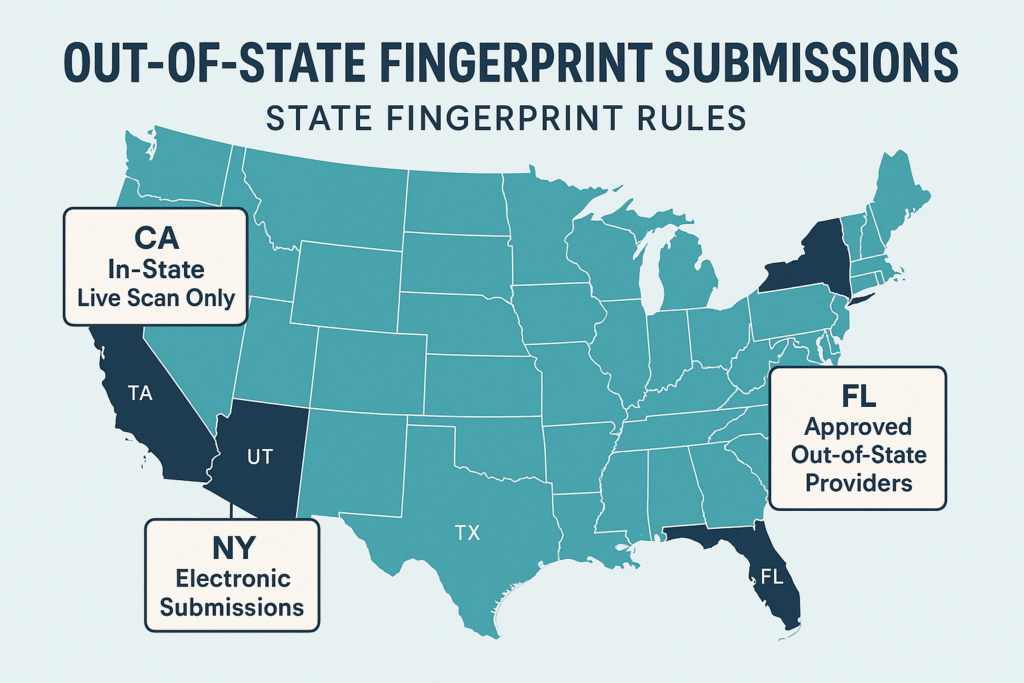
California: In-State Live Scan Only
California does not allow out-of-state electronic fingerprint submissions to the California DOJ. Anyone needing a California background check must visit an authorized Live Scan site within California. Applicants outside California can still get a California check: the agency asking for it sends a hard-card packet, and you mail in ink cards. This protects the integrity of the state database and ensures operators are certified by the DOJ.
Need FD-258 fingerprint cards rolled in Los Angeles? We supply the cards, roll the prints, and travel anywhere in LA. Same-day appointments available.
New York: It Depends on the Agency
Some New York agencies require you to be fingerprinted at a site in New York. The New York Department of State, for example, tells license applicants they must visit a New York site and shouldn’t book one outside the state. Other New York agencies accept ink cards through their fingerprinting vendor. Check your agency’s instructions before you book anything.
Florida: Registered Vendors or Card Scanning
For Florida health care background screening, you can use a Livescan provider whose equipment outside Florida is registered with FDLE, or have ink cards taken and mailed to an approved provider, who converts them to electronic format (Florida Health Care Clearinghouse). Don’t mail the cards to the agency itself unless your instructions say to.
Other States
Most other states work the same way: you’re fingerprinted in that state, or you send ink cards. Follow the instructions from the agency asking for the check, because they decide which cards and which address to use.
Applying for a healthcare license in another state? See our guides for doctors and for nurses and healthcare workers.
State Background Check vs FBI Check
State-level background checks search a specific state’s database. FBI background checks, on the other hand, search nationwide criminal records and can be processed through an FBI-approved channeler. This distinction is key—state submissions follow their own local rules, while FBI checks can be completed from anywhere in the U.S.
Tips Before You Begin
- Confirm which agency requires the report—state DOJ, licensing board, or employer.
- Ask if they require Live Scan (digital) or physical FD-258 cards.
- Verify whether your chosen vendor is authorized for that state’s system.
- Bring valid ID and all forms showing your ORI code or reason for submission.
Need Help with Your Fingerprinting?
Anshin Mobile Notary & Live Scan provides California Live Scan services and can guide you through the fingerprinting process. If you need both state and FBI background checks, our team can explain your options and help ensure your results are accepted where you need them.
Frequently Asked Questions
Can I do a California Live Scan from another state?
No. Live Scan has to be done at a certified site in California. If you’re outside California, ask the agency for a hard-card packet; California DOJ accepts ink cards too.
Does New York accept electronic fingerprints from outside the state?
It depends on the agency. Some, like the New York Department of State, require fingerprinting at a site in New York. Others accept ink cards through their vendor.
Can I use one fingerprint submission for multiple states?
No. Each state has its own database and submission process. You’ll need a separate submission per state agency.
What’s the difference between a state background check and an FBI check?
A state check covers one state’s criminal history; an FBI check covers all states. Learn how to get an FBI background check if your destination requires it.
How can I find my state’s fingerprinting authority?
Visit your state’s official Department of Justice or Public Safety website for current Live Scan or fingerprint card instructions. Helpful links include: